
Introduction
Runlet is a native macOS scratchpad for PHP that runs your code inside your real projects. Open a Laravel, Symfony, or WordPress project, write a few lines of PHP, and press ⌘R. The snippet runs inside your application, with its models, services, configuration, and database connection ready, on your Mac, in a Docker container, or on a server over SSH.
Runlet shows the result next to your code, along with the SQL it ran, the mail it sent, and the logs it wrote. So you can stop creating temporary routes, commands, and dd() calls just to answer a question about your application.
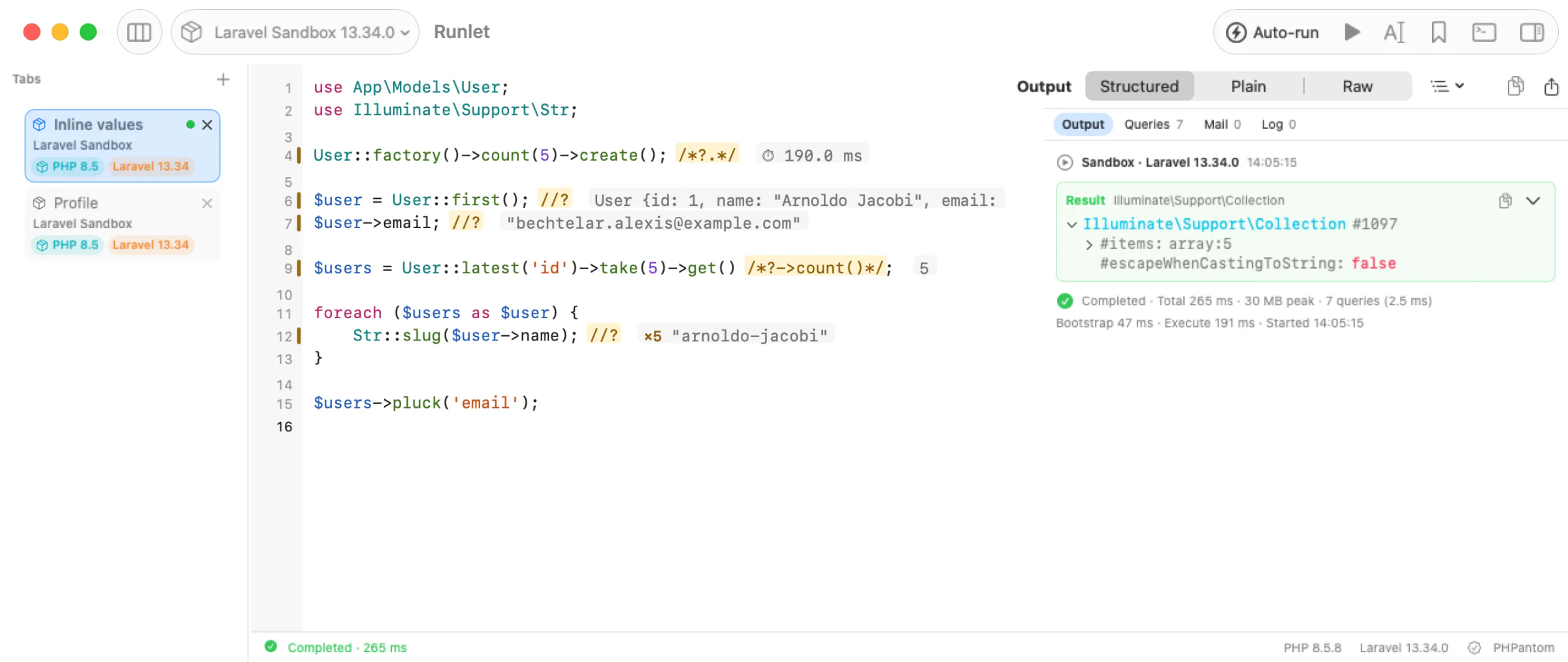
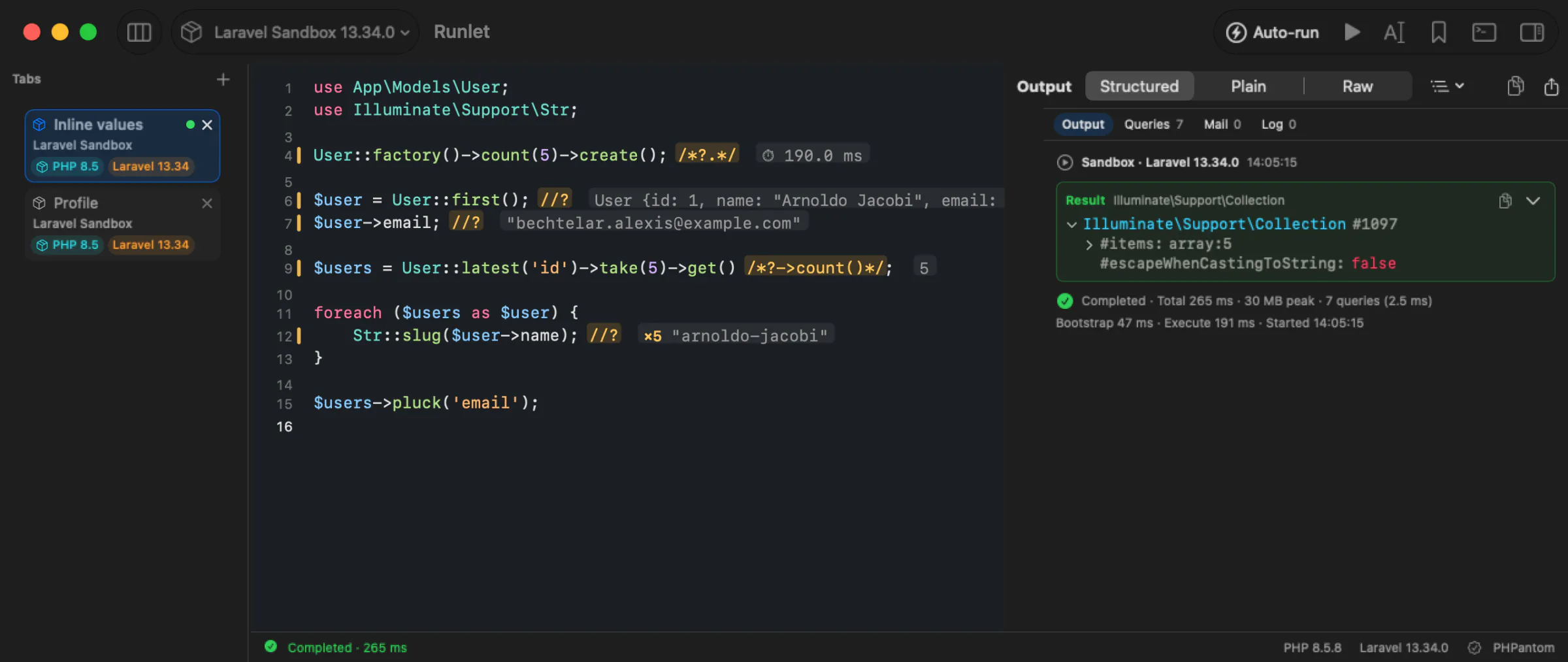
Runlet isn't an IDE. Keep writing your app in PhpStorm, VS Code, or Zed: Runlet sits next to your editor as the place where you try things out, and file paths in its output open at their line in your editor.
Runlet is free and open source under the MIT License. It has no account, no analytics, and no paid version.
NOTE
Runlet is an early preview, built quickly with AI assistance. Expect rough edges, and please report issues when you find them.
Why Runlet?
Explore your application. Write a line, add //?, and run it. The value appears at the end of the line, and the output pane has the whole model to expand:
use App\Models\User;

User::query()->latest()->first(); //?
Debug a query. Run it and open Queries: every statement with its bindings, time, connection, and the snippet line that ran it, with hints for repeated statements and N+1 patterns.
Try it where it matters. Switch the tab's target from your local project to its Docker container, or to a staging server over SSH, and run the same snippet there. Production targets ask before every run.
Let an AI agent investigate, safely. Claude Code, Cursor, and other MCP clients can propose PHP to run against your project. Runlet shows you the code and where it would run, and runs it only when you approve.
Who It's For
Runlet is built for PHP developers who:
- open
php artisan tinkermany times a day; - add a temporary route or command just to look at something;
- add
dd()and remove it five minutes later; - want to try code against the real application, not a blank playground;
- debug database behavior by running the query and looking at what happened;
- want AI agents to run diagnostic PHP without handing them the keys.
Where Runlet Fits
| Tool | Good at | Trade-off |
|---|---|---|
php artisan tinker | A REPL in the terminal; state carries over from line to line. | Results are text in a terminal. Runlet can open Tinker for you too (Open REPL). |
| Temporary routes, commands, or scripts | Full control, run exactly where the app runs. | They change the project, and someone has to remove them. |
dd() in application code | Quick and always available. | It edits app code and ends the request; it has to come out again. |
| IDE scratch files | Right next to your code. | How they boot your framework, and which PHP and environment they use, depends on the IDE and its plugins. |
| Runlet | A snippet runs inside your app on the target you pick, and its result, queries, mail, logs, timings, and profile show up next to it. Nothing is written into your project. | macOS only. Each run is a fresh PHP process, so variables don't carry over between runs (use Open REPL when you want that). |
What You Can Do
- Run code inside your application. Runlet detects Laravel, Lumen, Laravel Zero, Symfony, WordPress, and Composer projects and boots them for every run, so a snippet starts with your app ready. A project driver teaches it anything else.
- Run it where your app lives. Every tab has a target: the bundled Laravel sandbox, a local project, a Docker container, or an SSH server. Mark a target as production and every run asks first.
- See everything your code touched. The output,
dump()anddd(), the returned value as a tree or a table, exceptions with their line, SQL queries, mail, logs, and timings. - Query your databases. SQL tabs use your application's own connection, or one you save. Redis and MongoDB have tabs of their own.
- Keep what works. Personal snippets, project snippets your team commits, and run history.
- Work from the terminal and your AI tools. The
runletcommand opens folders and files, andrunlet mcplets AI clients ask to run code, with your approval.
Next Steps
Install Runlet, then follow the Quickstart: press ⌘R in the sandbox tab, and open your own project with ⇧⌘O. Everything in Runlet lists every feature, and the Tabs page shows how to organise your work.