
Explain a Captured Query
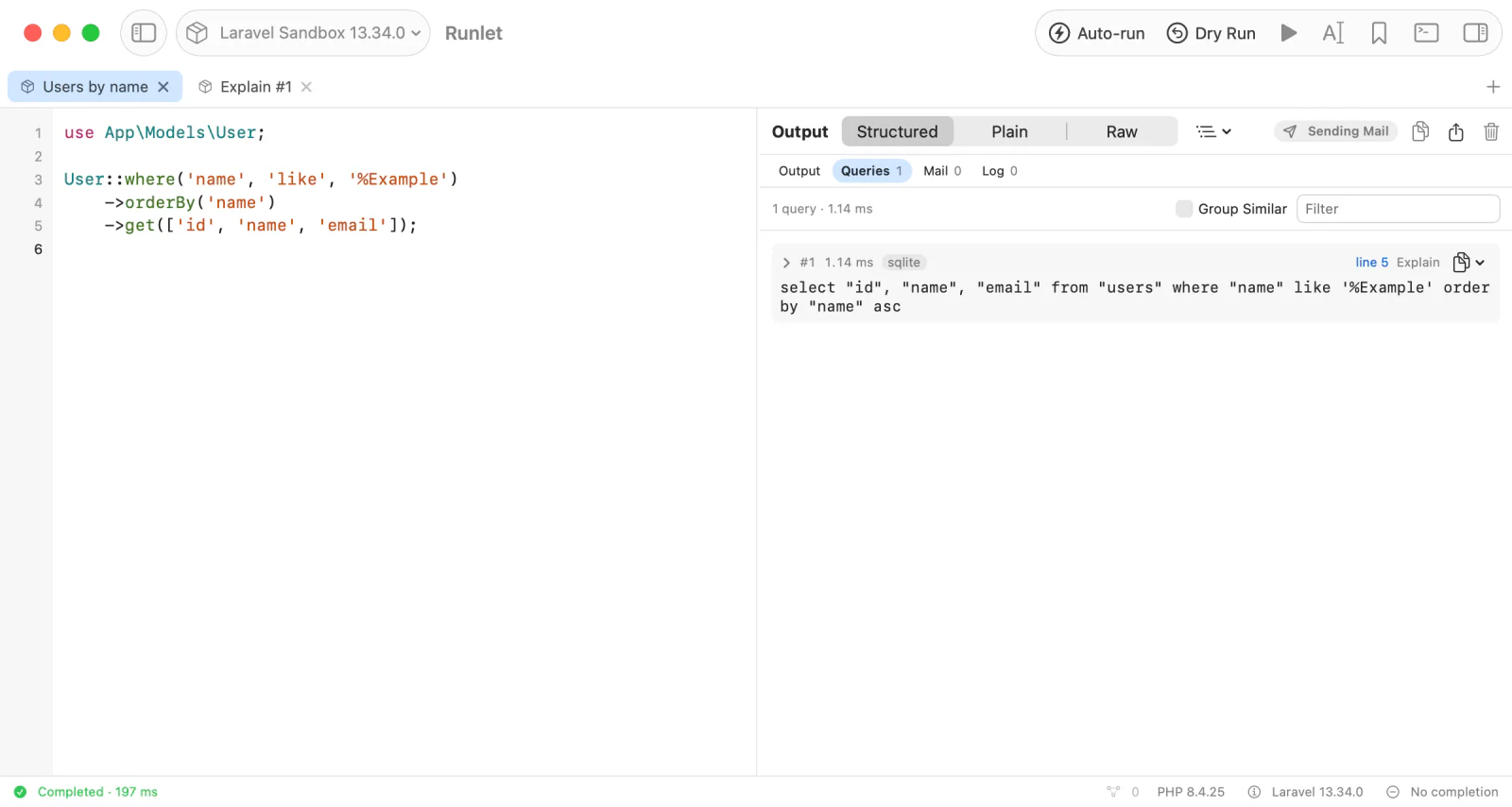
When a run's Queries list shows a slow statement, Explain opens its plan in a new tab: the same SQL, with the same bindings, on the connection and target it ran on. Nothing runs until you press Run.
This page is about queries a run captured. To explain a statement you write yourself, use Explain Statement in an SQL tab.
Explaining a Query
- Run a snippet, then open Queries in the output pane.
- Click Explain beside a statement, or choose it from the statement's context menu. Query rows in the timeline have Explain too. With Group Similar on, expand a group to explain one statement with its own bindings.
- Runlet opens an Explain #N PHP tab in the same window. Read the code, edit it if you like, and press Run (⌘R).
The new tab keeps the target the query ran on, even if you changed the original tab's target since. After that, it's an ordinary PHP tab: change its target, and later runs use the new one.
NOTE
Opening or restoring an Explain tab never runs it. On a production target, Run asks first as usual, and Cancel leaves the tab idle.
The Explain Tab
The tab holds PHP you can read before it runs. For a query a Laravel application ran on MySQL, it looks like this:
// Review this plan request, then press Run.
// Opening or restoring this tab never runs it.
$sql = "EXPLAIN FORMAT=JSON select * from `orders` where `status` = ? limit 20";
$bindings = [
    0 => "paid",
];
$connectionName = "mysql";
$connection = \Illuminate\Support\Facades\DB::connection($connectionName);
$plan = $connection->select($sql, $bindings);
// Runlet shows the plan as a tree, with the database's own output under Raw.
return function_exists('Runlet\explainPlan')
    ? \Runlet\explainPlan($plan, $connection, $connectionName)
    : $plan;
The SQL keeps its placeholders, and the bindings (with their types) and the connection's name stay separate, as the run captured them. Runlet asks for the plan in a format it can show as a tree, and never adds ANALYZE:
| Captured driver | Explain |
|---|---|
| MySQL, MariaDB | EXPLAIN FORMAT=JSON |
| PostgreSQL | EXPLAIN (FORMAT JSON) |
| SQLite | EXPLAIN QUERY PLAN |
| Not recorded | Plain EXPLAIN; its rows are the run's result |
WARNING
If you add ANALYZE to the SQL yourself, the statement runs, and the card shows its actual rows and times. This is your PHP: unlike Explain Analyze in SQL tabs, Runlet doesn't ask about writes or roll them back. A production target still asks before every run.
Reading the Plan
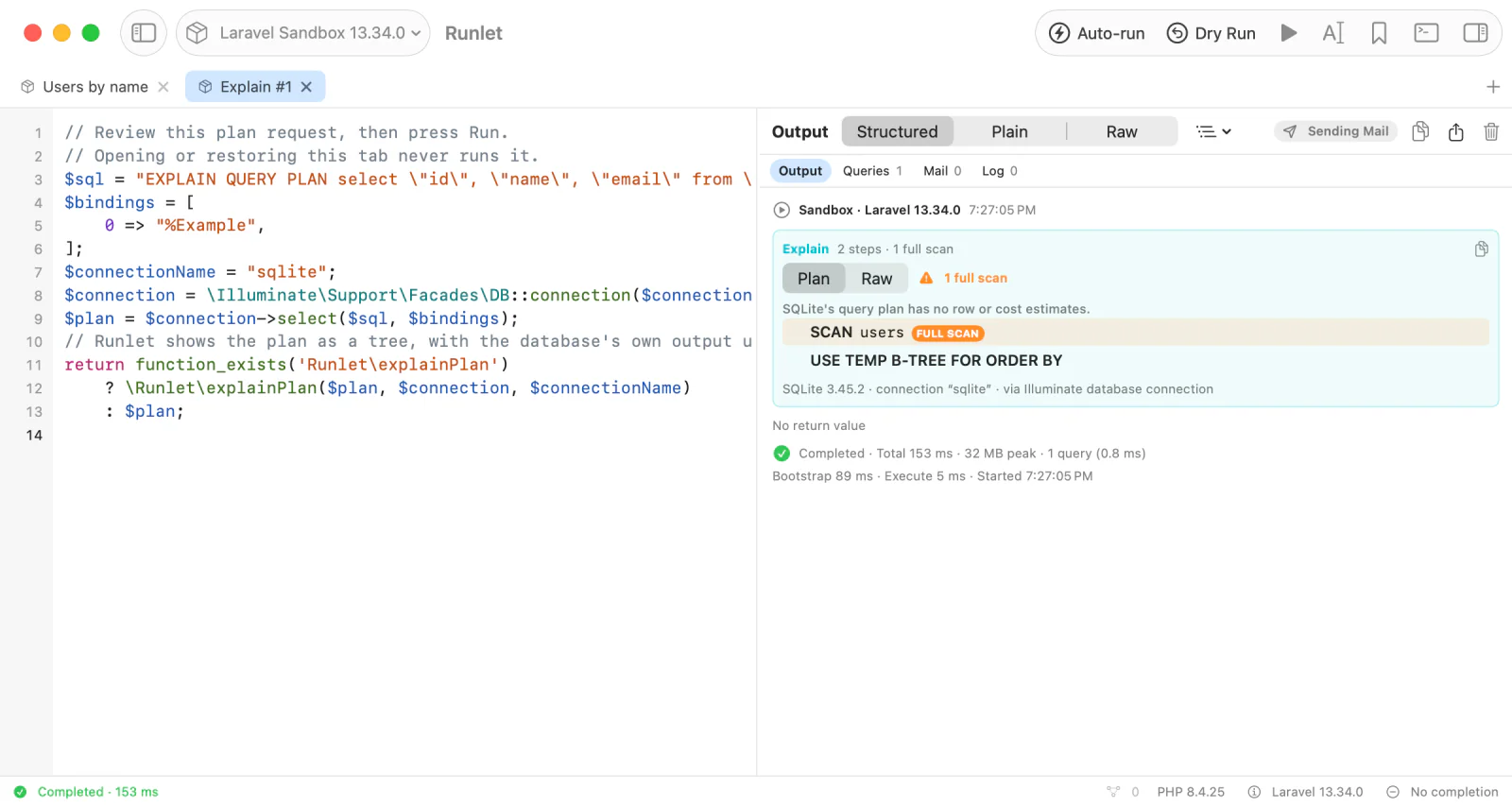
After Run, the output shows the plan card that SQL tabs use, instead of dumping the rows:
- the plan's steps as a tree, which you can collapse;
- full scans highlighted and counted;
- Raw, for the database's own output;
- a line naming the database and its version, the connection, and the database layer.
Showing a Plan From Any Tab
The Explain tab ends with a call to Runlet\explainPlan(), and any PHP tab can call it with rows of its own:
use Illuminate\Support\Facades\DB;

$rows = DB::select('EXPLAIN FORMAT=JSON SELECT * FROM orders WHERE status = ?', ['paid']);

return \Runlet\explainPlan($rows, DB::connection());
Runlet\explainPlan($rows, $connection = null, $connectionName = null) shows the plan card and sends nothing to the database:
$rowsare the EXPLAIN's rows: objects, arrays, or a collection.$connectionis where they came from: a PDO, a Laravel or Eloquent connection, a Doctrine DBAL connection,$wpdb, or the database's name (mysql,mariadb,pgsql,sqlite). Runlet reads the dialect and the server version from it, which tells MariaDB from MySQL. Without it, Runlet tells the database by the rows' columns.- Rows it can't read as a plan, such as MySQL's tabular
EXPLAIN, PostgreSQL's text plan, or another database's, come back as they are, so the run dumps them.
Outside Runlet's runner, the function doesn't exist, which is why the Explain tab checks function_exists() and returns the rows instead. The Snippet API lists Runlet's other functions.
Connections
The Explain tab opens the connection the query used:
| Captured from | The tab uses |
|---|---|
| Laravel, Lumen, Laravel Zero | The captured connection, through the DB facade |
| Eloquent without Laravel | Eloquent's configured connection resolver |
| Symfony | The captured connection of the Doctrine registry |
| WordPress | $wpdb. Its captured SQL already holds the values WordPress substituted. |
| Doctrine DBAL or PDO of your own | An editable template: set up the connection as $connection (DBAL) or $pdo first |
Each Run starts a fresh PHP process, so a connection that only the original snippet created isn't there. The template stops with a setup error until you create it; it never picks another connection.
The same goes for anything else the original snippet set up: temporary tables, transactions, and session settings need to be created again in the Explain tab. Whether a statement can be explained at all is up to the database.
When Explain Isn't Available
Explain is disabled, with the reason, when:
- the captured SQL or a binding was truncated;
- a binding's value can't be recreated, such as binary data, a resource, or an object (Runlet never rebuilds bindings from the display-only SQL with values filled in);
- the query ran on another database, such as SQL Server (its other query actions still work);
- WordPress ran it through its SQLite translation layer, which doesn't return plans through
$wpdb. WordPress on MySQL works.