
Project Drivers
A driver boots your application before a snippet runs, and decides which variables the snippet starts with. Runlet has built-in drivers for Laravel, Symfony, WordPress, and Composer projects (see Frameworks). A project driver, one PHP class in your project's .runlet/ folder, boots anything else, or changes how a built-in driver boots your app.
<?php
// .runlet/AcmeApiDriver.php
class AcmeApiDriver extends \Runlet\Driver
{
    public function bootstrap(string $projectPath): void
    {
        require __DIR__ . '/boot.php';
    }

    public function variables(): array
    {
        return ['_app' => \Acme\DI::get(\Acme\App::class)];
    }
}
A driver can also add project commands, record queries and mail for the run inspector, decide how your own types show in the output with casters, hand SQL, Redis, and MongoDB tabs the application's connections, and add sections to App Info.
How Runlet Picks a Driver
Each run is a fresh PHP process, and Runlet picks one driver for it:
- Project drivers in
<project>/.runlet/*Driver.php, if one of them can boot the project. - Built-in drivers, in this order. The first that recognises the project wins.
| Order | Driver | Recognised by | Reported framework | Snippet variables |
|---|---|---|---|---|
| 1 | Runlet\Drivers\LaravelDriver | bootstrap/app.php, plus artisan or the laravel-zero/framework package | laravel, lumen, or laravel-zero | $app |
| 2 | Runlet\Drivers\WordPressDriver | wp-load.php in the project, web/wp/ (Bedrock), public/wp/, wordpress/, or wp/ | wordpress | $wpdb |
| 3 | Runlet\Drivers\SymfonyDriver | bin/console, plus src/Kernel.php or config/bundles.php | symfony | $kernel, $container |
| 4 | Runlet\Drivers\ComposerDriver | composer.json or vendor/autoload.php | composer | None |
| 5 | Runlet\Drivers\PlainDriver | Anything else | plain | None |
Every driver works on PHP 7.4 and later. Everything a snippet itself can use (output, magic comments, the Runlet\ functions, snippet inputs, and these variables) is in the Snippet API.
Writing a Project Driver
Put a class that extends Runlet\Driver, or one of the built-in drivers, in a file named <Something>Driver.php in your project's .runlet/ folder:
<?php
// .runlet/AcmeApiDriver.php
use Acme\App;
use Acme\DI;

class AcmeApiDriver extends \Runlet\Driver
{
    public function canBootstrap(string $projectPath): bool
    {
        return is_file($projectPath . '/config/bootstrap.php');
    }

    public function bootstrap(string $projectPath): void
    {
        require __DIR__ . '/boot.php';
    }

    public function variables(): array
    {
        return ['_app' => DI::get(App::class)];
    }

    public function version(): ?string
    {
        return 'Acme Lease API';
    }
}<?php
// .runlet/boot.php: use paths relative to this file, not /var/www, so the same driver
// works on your Mac and inside the container.
define('BASE_PATH', dirname(__DIR__));
putenv('APP_NAME=Acme Lease API');
$app = require BASE_PATH . '/config/bootstrap.php';Snippets on this project now start with $_app, and the tab card shows the driver with its version, "Acme Lease API".
Where the folder must be. Runlet reads .runlet/ straight from disk, so it works even when .runlet/ is git-ignored (globally, for example). In Docker, the folder must be in the container's working directory, usually through the project mount. On an SSH host, it must be in the server's directory, committed or deployed: Runlet reads .runlet/ on the server, and a folder that exists only on your Mac isn't sent.
WARNING
Driver files are trusted code. They run with the same permissions as your snippets, on every run on that project, so review a .runlet/ folder you didn't write yourself.
Discovery Rules
- Composer first. Runlet loads
vendor/autoload.phpfirst, if it exists, so a driver can use project classes without loading Composer itself. If the application's own bootstrap requires the autoloader again, nothing breaks: Composer returns the loader that's already registered. - Order. Driver files load in name order. Each concrete
Runlet\Driversubclass declared in a.runlet/file is a candidate, in the order it's declared. The first whosecanBootstrap()returnstrueboots the project; if none does, built-in detection continues as usual. - What counts. Runlet ignores abstract classes, and files that don't end in
Driver.php. A driver can extend another driver from.runlet/that sorts later, because Runlet finds the parent class in.runlet/<ClassName>.php. - No subfolders. Only files directly in
.runlet/are drivers, so.runlet/snippets/can hold project snippets without any of them being loaded or run. - The reported framework is
custom:<ClassName>, and the tab card shows the driver's name.
Errors
Runlet reports errors raised by a project driver as boot errors, naming the file, the class, and the method:
Runlet driver AcmeApiDriver (.runlet/AcmeApiDriver.php) failed in bootstrap(): …That covers syntax errors and incompatible method signatures (fatal errors), exceptions from any driver method, and exit() during bootstrap(). To report a boot problem yourself, throw an exception from bootstrap().
The Driver API
Override only what you need: every method but bootstrap() has a default.
| Method | Default | Purpose |
|---|---|---|
name(): string | The short class name | The driver's name, shown in Runlet. |
canBootstrap(string $projectPath): bool | true | Whether this driver handles the project. $projectPath is the run's working directory. |
bootstrap(string $projectPath): void | Abstract | Boots the application. Throw to report a boot error. |
variables(): array | [] | name => value pairs that become $name in every snippet. Called after bootstrap(). |
version(): ?string | null | A version label, shown next to the driver's name. |
environment() | null | The application's environment, such as local or production. See The Application's Environment. |
commands(): array | [] | Commands for the Commands panel. See Project Commands. |
hostCommands(): array | [] | Commands that run on your Mac. See Host Commands. |
logPaths(): array | [] | Where the application writes its logs. See Log Paths. |
inspect(Inspector $inspector): void | Detects Eloquent and WordPress | Records queries, mail, logs, HTTP requests, jobs, events, and your own sections. See Run Inspector Hooks. |
preview($value): ?array | Laravel mail, views, HTML responses | HTML for a returned or dumped object. See Previews. |
casters(): array | [] | How your own classes show in the output. See Casters. |
sqlConnection(?string $connection), sqlConnections(): array | null, [] (built-in drivers: the framework's connections) | How an SQL tab reaches the database. See SQL Connections. |
sqlSchema(?string $connection): ?array | null (Runlet reads the catalog) | Tables and columns for SQL completion and the schema explorer. See Schema for Completion. |
redisConnection(?string $connection), redisConnections(): array | null, [] (Laravel: its Redis connections) | How a Redis tab reaches Redis. See Redis Connections. |
rollbackConnections(): array | Eloquent and $wpdb (built-in drivers add their own) | The connections a dry run rolls back. See Rollback Connections. |
panels(): array | [] | Extra sections for App Info. See Adding Sections. |
bootstrapExitHint(): ?string | null | Explains an exit() during bootstrap(). |
Methods you override must keep these signatures, including the return types: PHP rejects an incompatible declaration with a fatal error, and Runlet reports it as a boot error that names the driver file. environment() is the exception: it has no return type, so a driver that already had an environment() method of its own keeps loading, and an override may add : ?string.
Helpers
Subclasses can call:
consoleCommands(iterable $commands, string $commandPrefix): arrayformats Symfony Console commands forcommands().inspectEloquent(),inspectDoctrine(),inspectWordPress(), andinspectAutomatically()record queries for the run inspector.automaticRollbackConnections(): arrayis whatrollbackConnections()returns by default, for an override that adds to it.log(string $message, ?string $detail = null): voidadds a line to the Run Log (Run ▸ Show Run Log), such as a boot step or a timing.bootstrapExitHint(): ?string, when you override it, is appended to Runlet's "called exit() while bootstrapping" error, before the name of the last file loaded. The WordPress driver uses it to report the redirect WordPress tried, and who sent it.gitRevision(string $projectPath): ?stringreturns"main @ 3f2a1c9"for the Git checkout at$projectPath, ornullwhen there's no readable checkout. It reads.gitdirectly (loose and packed refs, a detached HEAD, and linked worktrees) and runs nogitcommand. It makes a goodversion():phppublic function version(): ?string { return $this->gitRevision(dirname(__DIR__)); // the project root, from .runlet/ }In Docker, the
.gitfolder must be mounted into the container. A linked worktree whose.gitfile points at a path on your Mac can't be read there.
Extending a Built-in Driver
The built-in drivers are ordinary classes, so you can extend them and call parent:::
<?php
// .runlet/TenantDriver.php
use App\Services\PriceFormatter;
use Runlet\Drivers\LaravelDriver;

class TenantDriver extends LaravelDriver
{
    public function name(): string
    {
        return 'Tenant Laravel';
    }

    public function bootstrap(string $projectPath): void
    {
        parent::bootstrap($projectPath);
        config(['app.tenant' => 'acme']);
    }

    public function variables(): array
    {
        return parent::variables() + [
            'tenant' => config('app.tenant'),
            'formatter' => $this->app->make(PriceFormatter::class),
        ];
    }
}
The built-in drivers give subclasses these members:
| Driver | Members |
|---|---|
Driver (every driver) | The helpers above, and sqlConnection() and sqlConnections() for SQL tabs |
LaravelDriver | $this->app; flavor($projectPath) returns laravel, lumen, or laravel-zero; overridable consoleScript($projectPath), inspectLaravelMail(), and inspectLaravelLog() |
SymfonyDriver | $this->kernel; overridable loadEnvironment() and kernelClass() |
WordPressDriver | Overridable locateLoader() and prepareRequest() |
ComposerDriver | requireAutoloader($projectPath) |
Variables and Reporting
Runlet imports the driver's variables into the snippet's scope before the snippet runs. A snippet can reassign them, but that doesn't affect the driver. Names that can't be PHP variables are skipped, and so are this, GLOBALS, and names starting with __runlet; a notice lists what was skipped.
Runlet learns each variable's class (or type: int, float, bool, string, array, null, resource) from the run, so completion knows $_app as an Acme\App. The Commands panel shows the variables too: click one to insert it at the caret.
The Application's Environment
environment() returns the name the application uses for where it runs. Runlet compares it with how the target is marked: when the application says production, prod, prd, or live and the target isn't marked as production, the tab offers Mark as Production (Environments & Production). History keeps the name with each run.
public function environment(): ?string
{
    return getenv('ACME_ENV') ?: null;
}- Return the name only. Never return or log other configuration: Runlet shows the value, and stores it in its history.
- Control characters are dropped, the name is trimmed, and at most 64 characters are kept. A value that isn't a string, or is empty, means no environment.
- If
environment()throws, the Run Log says so, and the run continues without an environment. - The built-in drivers report
app()->environment()(Laravel, Lumen, and Laravel Zero), the kernel's environment (Symfony), andwp_get_environment_type()(WordPress 5.5 and later). Plain PHP and Composer projects report none. A driver that extends a built-in one inherits itsenvironment().
Casters
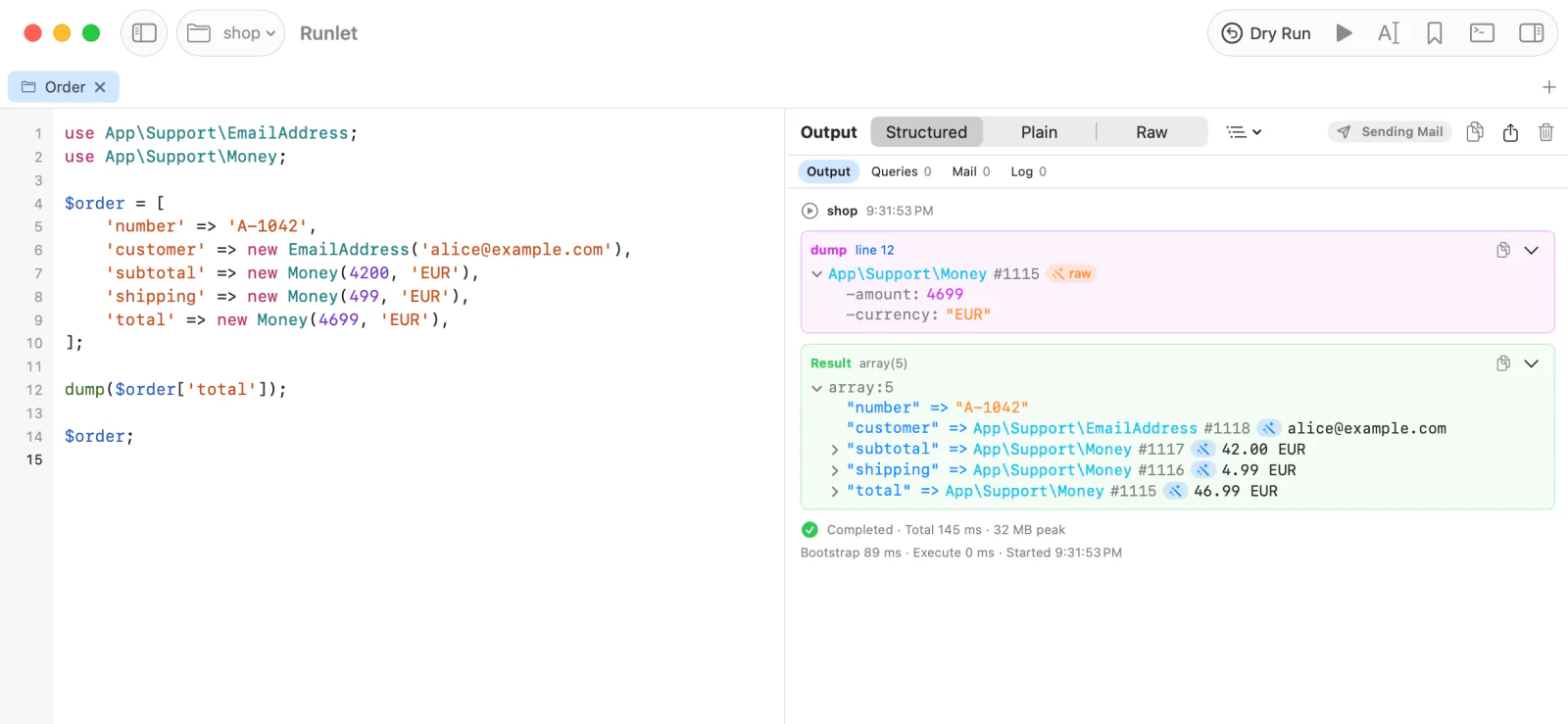
Runlet shows an object by reading its properties. It never calls the object's methods to show it: no getters, __toString(), or __debugInfo(). That keeps output safe, but a value object such as Money reads poorly as -amount: 4699 and -currency: "EUR". Your driver's casters() method says how your own types show instead:
<?php
// .runlet/ShopDriver.php
use App\Support\EmailAddress;
use App\Support\Money;
use Runlet\Cast;
use Runlet\Drivers\LaravelDriver;

class ShopDriver extends LaravelDriver
{
    public function casters(): array
    {
        return [
            Money::class => fn (Money $money) => new Cast($money->format(), [
                'amount' => $money->amount(),
                'currency' => $money->currency(),
            ]),
            EmailAddress::class => fn (EmailAddress $email) => $email->value(),
        ];
    }
}
Now dump($order->total) shows the class with 46.99 EUR after it, and expanding it shows amount: 4699 and currency: "EUR". An email address shows as its address.
What a Caster Returns
casters() maps a class or interface name to a callable, such as a closure or [$this, 'castMoney']. Runlet calls it with the object, and shows what it returns:
| The caster returns | The object shows |
|---|---|
| A string, an integer, a float, or a boolean | As its class and this summary line: Money 46.99 EUR. |
| An array | As its class with these fields, which expand like any value. |
new \Runlet\Cast($summary, $fields) | Both: the summary line, and the fields below it. |
null | As Runlet shows it without a caster. Use it to cast only some objects of a class. |
| Another object | As its class, with that object as its one field, value. |
Fields are shown the way Runlet shows any value, so an object in a field gets its own caster, if it has one.
Which Caster Applies
Each object gets at most one caster, the most specific:
- A caster for the object's own class.
- A caster for its parent class, then the parent's parent, and so on.
- A caster for an interface it implements, in the order
casters()lists them.
Class names match without regard to case, as in PHP, and may start with a backslash. Runlet never autoloads a class to find a caster.
A caster for a class that Runlet already shows in its own way, such as a date or an Eloquent model, replaces that view for the classes it names.
Where Casters Apply
Casters apply wherever Runlet shows a value from the run: the Result card, dump() and dd(), magic comments and their hover panel, the context of \Runlet\notice(), warning(), and error(), and values in the run inspector. Tables show a cast object's summary line in its cell, or its fields as columns, and Copy as JSON and Copy as PHP copy what is shown.
A cast value has a small wand mark after its class. Hover over it to see which driver showed it. Click it to see the object as Runlet sees it, marked raw, and click again to go back.
When a Caster Fails
A caster that fails doesn't break the run:
- It throws. The object shows as Runlet sees it, with a note that names the error:
caster: RuntimeException: Rates unavailable. - It returns the object itself. The object shows as Runlet sees it, with a note. An object that appears again in its own fields shows as "see above".
- It's slow. A value's casters get one second together. After that, the value's other objects show as Runlet sees them, each with a note. A caster that's still running can't be stopped, so keep casters fast.
casters()throws, or lists something that isn't a class name and a callable. A notice says so, and values show as Runlet sees them, or the other casters still apply.
Values that a caster dumps itself show as Runlet sees them, without casters.
WARNING
Casters are trusted driver code, like the rest of your driver. They run while the output is shown, every time an object of their type is, so keep them free of side effects: read the object, and don't query the database or call services. A query a caster runs shows in Queries.
Limits
What a caster returns counts against the value's limits, like any value: depth 8, 200 fields, 64 KiB per string, and 2 MiB per value. A summary line is cut at 1,000 bytes. The raw objects behind cast values use at most a quarter of a value's size; when that's used up, the wand mark says the raw object was left out.
The built-in drivers declare no casters. When you extend one, parent::casters() + [...] keeps working if a later version adds some.
Log Paths
The log viewer (View ▸ Logs) finds Laravel's storage/logs/**/*.log, Symfony's var/log/**/*.log, and WordPress's wp-content/debug.log by itself, by reading the project's folder: nothing runs for that. An application that logs elsewhere can say where with logPaths():
public function logPaths(): array
{
    return [
        'storage/logs/worker.log',   // a file, relative to the project
        'var/log',                   // a folder: its *.log files
        'logs/app-*.log',            // a pattern in the last part
        '/var/log/php-fpm/www.log',  // absolute, as the application sees it
    ];
}- Declarations only.
logPaths()is called beforebootstrap(), withhostCommands(), when the Commands panel lists the project's commands, so a project that can't boot still declares them. It must not read or write anything. - The log viewer never calls it. It uses the paths from the target's last command listing, and lists them first.
- Paths. On your Mac, a path is used only inside the project's folder. For Docker and SSH targets, an absolute path is the container's or the server's, and a relative one is relative to the profile's directory there.
- At most 50 paths of at most 1,024 characters are kept, each once; other entries are skipped. If
logPaths()throws, Runlet shows a notice, and the commands are still listed.
Project Commands
A driver adds commands to the Commands panel with commands(). The Laravel and Symfony drivers list every visible Artisan or bin/console command. See Adding Commands.
Host Commands
hostCommands() declares commands that run on your Mac, in the project's folder there, such as docker compose or your team's own CLI. See Host Commands.
Open REPL
The Commands panel's Open REPL opens Tinker, PsySH, or php -a on the tab's target. A driver can't change the REPL yet. See Open REPL.
Tests
The Commands panel's Tests group runs the project's test suite with php artisan test, Pest, or PHPUnit, and is disabled on production targets. See Tests.
SQL Connections
SQL tabs use the application's own database connection, which a driver hands over with sqlConnection() and sqlConnections(): a \PDO, or a callable for a client without PDO. The Laravel, Symfony, and WordPress drivers implement both. See SQL Connections.
Schema for Completion
When Runlet can't read the connection's catalog, sqlSchema() returns the tables and columns for SQL completion and the schema explorer. See Schema for Completion.
WordPress Connection
The WordPress driver opens a PDO connection from wp-config.php's settings for SQL tabs, and falls back to $wpdb with the reason. See WordPress Connection.
Redis Connections
Redis tabs use the application's own Redis connection through redisConnection() and redisConnections(); the Laravel driver implements both. See Redis Connections.
Rollback Connections (Dry Runs)
With Dry Run on, Runlet rolls back every connection rollbackConnections() returns. See Rollback Connections and Dry Run.
App Info
App Info shows facts about the application, and a driver adds its own sections with panels(). See App Info.
Run Inspector
The run inspector records the queries, mail, logs, HTTP requests, jobs, and events of a run, and a driver adds more in inspect(): other database layers, plain PDO connections, its own HTTP clients and queues, and sections of its own. See Run Inspector Hooks.
Custom Sections, Logs, HTML
$inspector->record(), log(), and html() add values, log messages, and rendered HTML to sections of your own, such as "Cache" or "Payments". See Custom Sections, Logs, and HTML.
Mail Interception
With Intercept mail on, drivers record mail without sending it. See Mail Interception.
The Mail Chip
The output header's mail chip shows whether runs on the target send or intercept mail, and changes it. See The Mail Chip.
Previews
preview() renders a returned or dumped object as HTML next to the value tree. See Previews.
Benchmarks
Runlet\bench() measures code in any snippet, and shows a benchmark card. See Benchmarks.
Porting from Tinkerwell
Runlet doesn't load Tinkerwell drivers, but porting one is mostly a rename. See Porting from Tinkerwell.
Limitations
- Driver files are trusted code. They run with the same permissions as your snippets.
- WordPress loads in a function scope, as under WP-CLI, and boots a multisite network's main site. See WordPress Limitations.
- No driver for some frameworks. Testbench, Craft, Drupal, Magento, and other frameworks have no built-in driver yet. Use a project driver.