
Project Snippets
Project snippets are files in your project's .runlet/snippets folder, so your team shares them through git: runbooks, diagnostics, and queries everyone needs now and then. Runlet lists them in the Snippets panel above your personal snippets.
<?php
/**
 * @label Recent users
 * @description The ten newest accounts,
 *   newest first
 */

User::latest()->take(10)->get();
A project snippet can be PHP, SQL, MongoDB, or Redis. Loading, opening, or copying one never runs it.
Where Runlet Looks
Runlet reads the .php, .sql, .mongodb, and .redis files in <project>/.runlet/snippets/. The project folder depends on the current tab's target:
| Target | Project folder |
|---|---|
| Local project | The project's folder. |
| Docker profile | The profile's Local source checkout (Code Intelligence in the profile editor). Without one, there are no project snippets. |
| SSH profile | The profile's Local folder checkout, also for profiles that run in a container on the server. Without one, there are no project snippets. |
| Laravel sandbox | None. |
Only files directly in snippets/ count. Runlet skips hidden files, nested folders, files that aren't UTF-8 or can't be read, and files over 1 MiB, and sorts the snippets by label.
NOTE
The .runlet folder also holds project drivers, as .runlet/*Driver.php files. A snippet in .runlet/snippets is never loaded as a driver, and never runs on its own.
File Format
A PHP snippet is a PHP file with an optional docblock at the top:
- Metadata. The first docblock counts as metadata when it comes before any code (whitespace and other comments may come first) and has
@label,@description, or@input.@labeland@descriptioncan go on over the next lines. Other tags are ignored, and a docblock without these tags is part of the code. - Label.
@label, or the file name without.php. - Inputs.
@inputlines ask for values when the snippet opens, and put them at the top of the code. See Snippet Inputs. - Code. The file without its
<?phptag and its metadata docblock, with leading blank lines and trailing whitespace removed. That's what Runlet shows and puts in the editor.
TIP
The format matches Tinkerwell's .tinkerwell/snippets, so you can move those files to .runlet/snippets as they are.
In the Snippets Panel
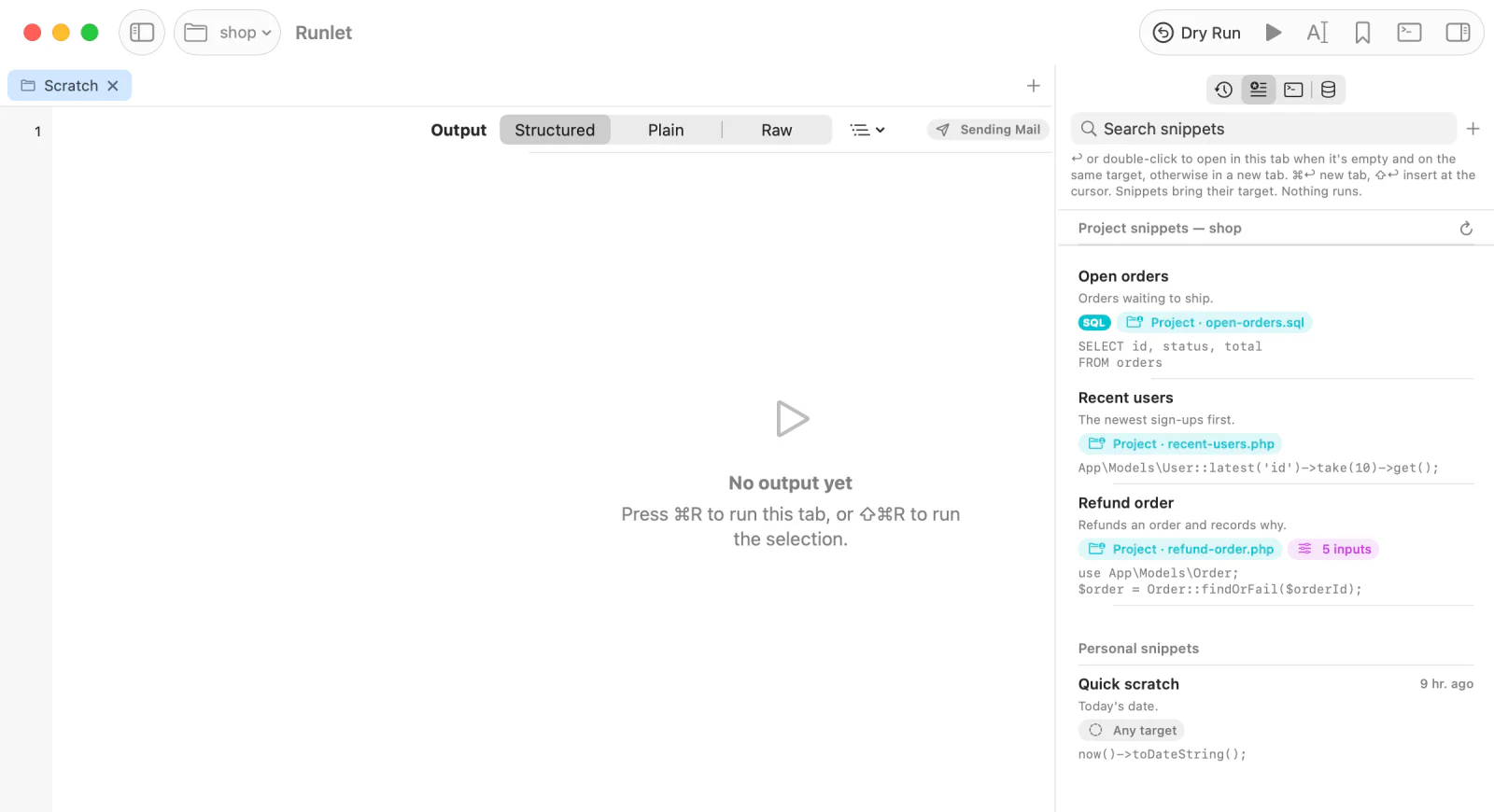
When the current tab's target has a project folder, the Snippets panel (⇧⌘L) shows a Project snippets — <name> section above your personal snippets. The rows are read-only: edit the file to change a snippet. The search field filters both sections, and Return, double-click, ⌘Return, and ⇧Return work as for personal snippets.
| Action | What it does |
|---|---|
| Open in Current Tab | Replaces the tab's code. The tab keeps its target. |
| Open in New Tab | Opens the code in a new tab on the project's target. |
| Copy Code | Copies the code. |
| Copy to Personal Snippets | Saves an editable personal copy, on the project's target, with its description and @input lines. |
| Reveal in Finder | Shows the file. |
| Save as Artisan Command…, Save as Test… | Writes the snippet into the project as a command class or a Pest or PHPUnit test, without running it. See Promote a Snippet. |
A snippet with @input lines shows an inputs badge, and opening it in any way first shows the input form. In Open Anything (⌘P, then #), a snippet that isn't PHP shows its language (Project · Redis), and typing the language finds it.
Changes on Disk
Runlet follows the snippets folder of every project an open tab uses. When a snippet file is added, edited, saved over (by an editor, git checkout, or git pull), renamed, or deleted, the panel and Open Anything update about a quarter of a second after the folder goes quiet. The folder itself may come and go while Runlet is open.
- Only the list changes. Tabs opened from a snippet keep their code, a selected snippet stays selected while its file exists (a renamed file is a new row), and nothing runs.
- Which folders. The same project folders as in Where Runlet Looks. Nothing in a container or on a server is followed. A project is followed while a tab uses it.
- Reload. The reload button in the section's header reads the folder at once, for volumes that don't report changes, such as some network shares.
Saving a Project Snippet
When the tab's target has a project folder, Save as Snippet… (⌥⌘S) offers Save to: Personal / Project (.runlet/snippets). Choose Project, give it a label and an optional description, and Runlet writes .runlet/snippets/<slug>.php: the label in lowercase letters and digits joined by -, such as recent-users.php. SQL, MongoDB, and Redis tabs write .sql, .mongodb, and .redis files.
If the file already exists, Runlet asks before replacing it. Saving only writes the file: commit it to share it.
SQL Snippets
.sql files are SQL snippets. They're listed with the others, with an SQL badge, and open as SQL tabs:
-- @label Pending orders
-- @description Orders waiting for payment,
--   oldest first

SELECT id, customer_id, total, placed_at
FROM orders
WHERE status = 'pending'
ORDER BY placed_at;- Metadata. The first run of
--comment lines before any statement, when it has@labelor@description(a blank line ends the run), or a/** … */docblock as in PHP files. It's left out of the code; comments without these tags stay in it. - Label.
@label, or the file name without.sql. - No inputs.
@inputlines mean nothing in SQL snippets. - Connection. An optional
@connectionline; see Connections. - Saving. Save Snippet to Project… from an SQL tab writes
-- @labeland-- @descriptionlines, and an-- @connectionline for the tab's connection unless you turn that off in the sheet.
Connections
An SQL snippet can name the connection it opens on:
-- @label Monthly revenue
-- @connection reporting

SELECT strftime('%Y-%m', placed_at) AS month, sum(total) AS revenue
FROM orders
GROUP BY month;
-- @connection <name>opens on a saved connection with that name if the tab's target has one (its own first, then one for all targets; names ignore case). Otherwise it opens on the application's connection with that name, such as a key of Laravel'sdatabase.connectionsor a Doctrine connection. The name is the rest of the line, spaces included.-- @connection <name> (saved)opens only on a saved connection. When the target has none with that name, the tab uses the default connection, and the SQL bar says the snippet's connection no longer exists.- Only names are written, never a host, user, database, or password, so the file can be committed, and it works for everyone with a connection of that name.
- The line may also be in a
/** … */docblock (* @connection reporting). On its own, it still counts as metadata. PHP snippets ignore it. - Saving from an SQL tab writes
-- @connection reportingfor an application connection and-- @connection Reporting (saved)for a saved one, and nothing for the default connection.
The panel shows the connection as a badge, the search matches it, and Copy to Personal Snippets keeps it. Opening never connects or runs anything; see Which connection opens.
MongoDB Snippets
.mongodb files are MongoDB snippets. They start with // lines for @title (or @label), @description, @connection, and @input, followed by one JSON query. The inputs' values fill {"$input": "name"} placeholders as JSON values. They open as MongoDB tabs on their connection, and saving a MongoDB tab to the project writes a .mongodb file. See MongoDB ▸ Snippets.
Redis Snippets
.redis files are Redis snippets, for runbooks such as "inspect a user's session" or "clear a stuck queue lock". They're listed with a REDIS badge and open as Redis tabs:
# @title Inspect a user's session
# @description The session hash, how long it lives,
#   and the user's rate-limit counter
# @connection cache
# @input string $user "User id" = "42"
# @input int $window "Window (seconds)" = 60 {60, 300, 3600}

# Nothing runs on its own: put the caret on a line and press Run, or Run All.
HGETALL session:$user
TTL session:$user
GET rate:${user}:$window- Commands. One per line, quoted as in a Redis tab (like
redis-cli). A line that starts with#is a comment. - Metadata. The first run of
#lines (blank lines before it are skipped; a blank line or a command ends it), when it has@title(or@label),@description,@connection, or@input. It's left out of the commands, and other comments stay.@titleand@descriptiongo on over the next#lines without a tag. - Label.
@title, or the file name without.redis. - Connection.
# @connection <name>or# @connection <name> (saved), by the rules of SQL snippets, for Redis connections: the target's saved Redis connection with that name, then one for all targets, and otherwise the application's Redis connection (a key ofconfig('database.redis'), such asdefaultorcache). An SQL connection never counts. A missing(saved)connection opens the tab on the default connection, with a note in the Redis bar. - Saving. Save Snippet to Project… from a Redis tab writes
# @title,# @description, a# @connectionline for the tab's connection (unless you turn that off), any# @inputlines the tab starts with, a blank line, and the commands.
Inputs in Redis Snippets
@input lines are snippet inputs. Their values fill $name, or ${name} when a letter, digit, or _ follows (${user}_lock), in the commands' unquoted arguments, as a whole argument or part of one (session:$user). The tab opens with the commands only.
Each filled argument is written back as one Redis argument, quoted when it needs to be, so a value can never split an argument, start another command, or turn a line into a comment:
Input value for $user | session:$user becomes |
|---|---|
42 | session:42 |
ada "the countess" | "session:ada \"the countess\"" |
ada and lovelace on two lines | "session:ada\nlovelace" |
- Numbers are written as Redis reads them (
42,2.5), and aboolas1or0. - A placeholder in quotes (
'$user'or"$user") stays text, as does$namewhennameisn't an input. Comment lines, and lines that don't parse, stay as written. - The input form previews each argument.
NOTE
Read-only connections, the dangerous-command confirmation, and production's confirmation apply when you run the opened tab, as in any Redis tab. AI clients can read .redis snippets but not run them.