
Environments & Production
Every target has an environment: development, staging, or production. Mark your live systems as production, and Runlet makes them hard to touch by accident: a red badge wherever the target appears, and a confirmation before every run.
Marking a Target
Set the Environment (Development, Staging, or Production) and an optional Colour in the target's settings:
- a local project's Project Options… (in the target menu);
- a Docker profile's Environment section;
- an SSH profile's form, or the Profiles window (Library ▸ Manage Profiles…).
New targets are development. When you import SSH hosts, Runlet suggests an environment from each alias and host name: a word such as prod, production, live, or prd (as in shop-prod) suggests production, and staging, stage, stg, uat, preprod, or qa suggest staging. Check the suggestion before you import.
The Laravel Sandbox is always development. A saved database connection has a marking of its own, and a run uses the stricter of the two: a production connection on a development project asks like a production target.
How Production Looks
- A red PRODUCTION badge next to the target menu in the toolbar, on the tab (a red stripe on a vertical tab card), in the target menu, in Open Anything, and in Settings ▸ Targets. The status bar turns red.
- Staging shows an orange STAGING badge.
- A colour draws a stripe on the target's tab cards and along the status bar.
Confirming a Run
On a production target, Run and Run Selection first show what's about to run, and where: the target (for an SSH host, user@host:directory), and the first 12 lines of the code or the selection, with its line count.
| To | Press |
|---|---|
| Run it (Run on Production) | ⌘Return |
| Cancel | Return or Esc |
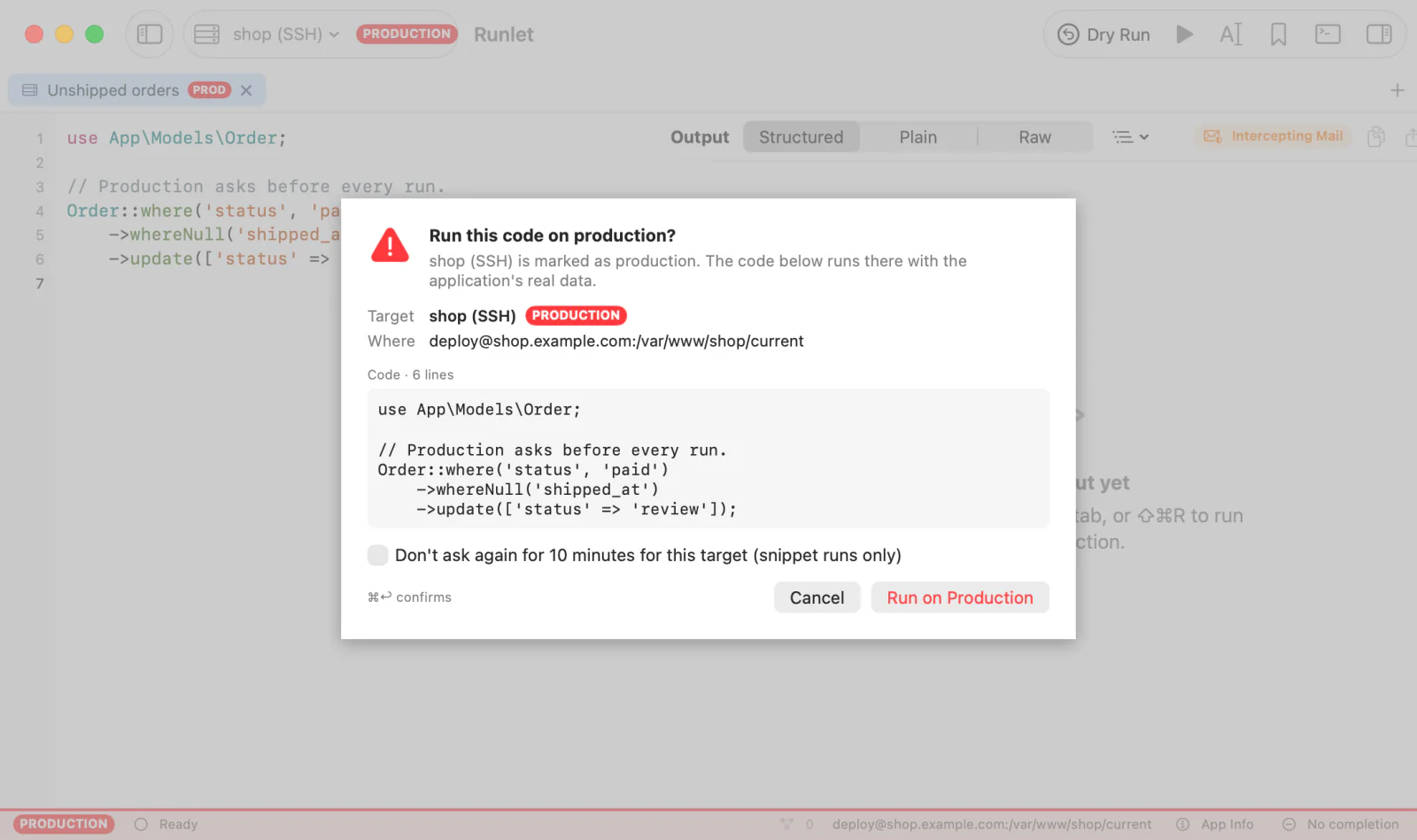
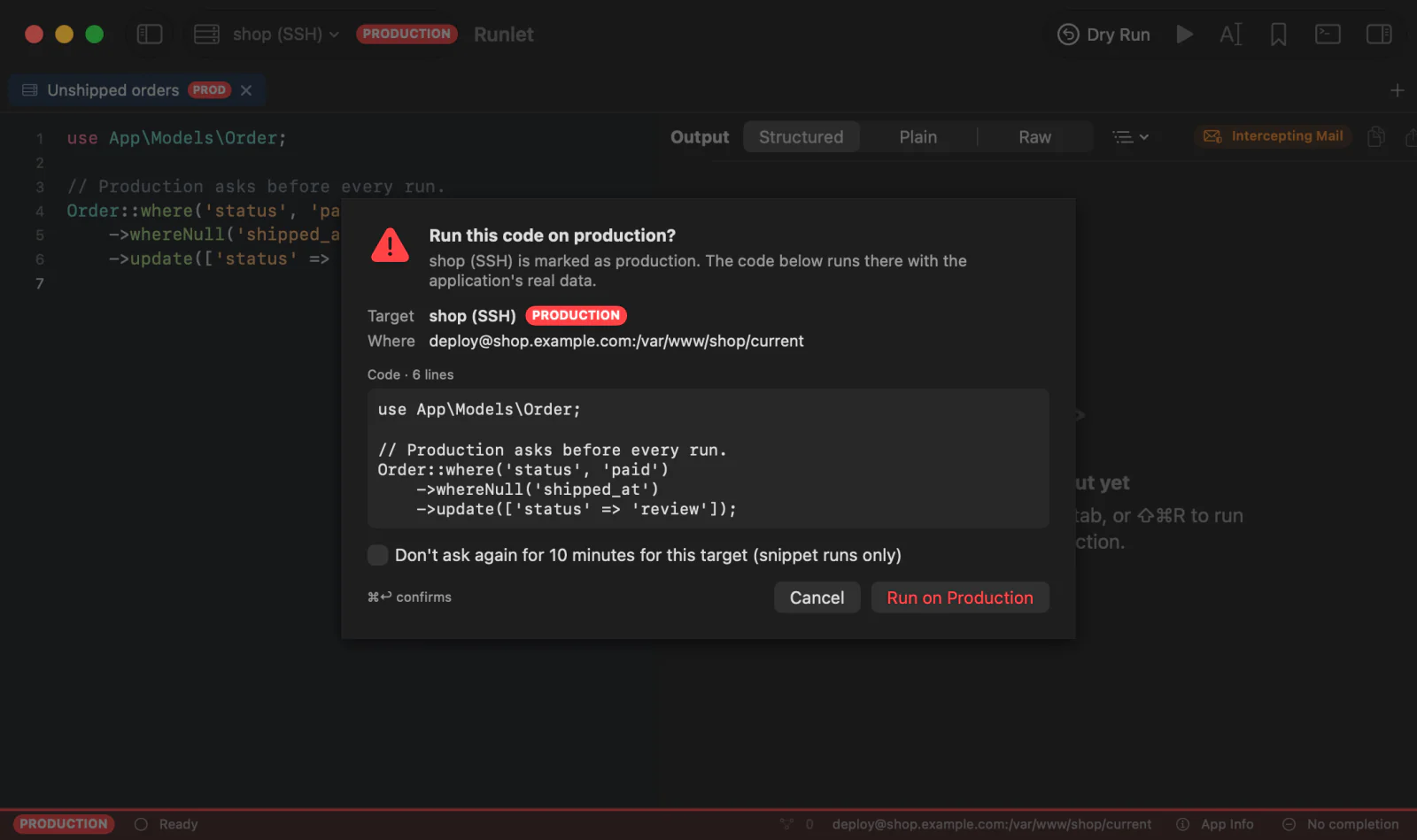
A plain Return cancels on purpose: a reflexive Return never runs code on production.
Not Asking for 10 Minutes
Tick Don't ask again for 10 minutes for this target (snippet runs only) to skip the question for your next snippet runs on that target. It lives in memory only, and ends:
- after 10 minutes;
- when Runlet quits;
- when you save the target's settings.
It covers snippet runs only. Everything in the next section asks every time, and a dry run neither uses nor grants it.
What Always Asks
On a production target, these ask every time, whatever you ticked before:
| Feature | What asks |
|---|---|
| Project commands | Listing the commands (it boots the application), each command, and host commands that run on your Mac for that target. |
| Shells and REPLs | A shell on the server, and Open REPL (Tinker, PsySH, or php -a). |
| App Info | Every load. |
| SQL tabs | Every statement, Run All, Load Next, Load Schema, Explain, browsing and editing a table, importing, and exporting. |
| Redis and MongoDB tabs | Every command and every read. |
| Logs | Following a log. |
| AI clients | Every run an AI client asks for, with a red production warning. |
WARNING
A REPL asks once, when it opens. After that, every line you type runs on production without another question.
Stop never asks. It only stops what you already confirmed, and so do closing a connection and disconnecting.
Tests Are Disabled
The Commands panel's Tests group is disabled on every production target, with the reason: test suites often reset or migrate the database, and the test database isn't always a separate one. The Artisan test command and a composer test script stay in the command list, and ask first like every command.
Stricter Defaults
- The Commands panel never lists a production target's commands by itself.
- Runlet never looks inside a production Docker container to learn about it: it reads the profile's local source on your Mac instead, or waits for a run.
- SSH hosts never connect by themselves, production or not.
When the Application Says It's Production
When a run boots the application, Runlet reads the environment the application says it's in: app()->environment() in Laravel, the kernel's environment in Symfony, wp_get_environment_type() in WordPress, or a project driver's environment(). Only the name is read.
If the name is production, prod, prd, or live (in any case) and the target isn't marked as production, the tab shows a notice. It says that the run which revealed it didn't ask first, and offers:
- Mark as Production: marks the target as production, as its settings would. The badge and the confirmation apply from the next run. Nothing runs.
- Dismiss: hides the notice for that target, also after Runlet restarts.
A target marked as production whose application says local, development, or dev gets a note with Dismiss only: the marking stays, and runs keep asking. Runlet never changes a marking by itself.
TIP
WordPress says production when WP_ENVIRONMENT_TYPE isn't set, so a local WordPress site without it shows the notice once. Define WP_ENVIRONMENT_TYPE as local in wp-config.php, or dismiss the notice.
Production in History
Each Run History entry keeps how its target was marked when it ran, and the environment the application reported:
- Runs on production targets have a PROD badge (STAGING for staging), and the target's icon takes its colour.
- The entry's status line and tooltip show the reported environment, such as
env production. - Editing the target later doesn't relabel earlier runs. Entries recorded before Runlet kept this have no badge.
- Running the same code again moves its entry to the top, with the new run's marking.
Search History for production to find runs on production targets, and runs whose application reported it.