
Snippet Inputs
A snippet can declare inputs in its docblock. When you open it, Runlet asks for their values in a small form and puts them at the top of the code. Nothing runs: you check the code, then press Run.
Inputs make snippets into runbooks, such as "refund order #…", that would otherwise need editing before every use. They're the successor of Tinkerwell's dynamic snippets.
Declaring Inputs
Add one @input line per value to the snippet's docblock:
@input <type> $<name> ["Label"] [= default] [{choice, …}]For example, a support runbook shared with the team as .runlet/snippets/refund-order.php (a project snippet):
<?php
/**
 * @label Refund order
 * @description Refunds an order and records why. Support runbook.
 * @input int $orderId "Order ID"
 * @input float $amount "Amount" = 19.99
 * @input string $reason "Reason" = "duplicate" {duplicate, fraudulent, requested_by_customer}
 * @input string $note "Internal note"
 * @input bool $notify "Email the customer" = true
 */

use App\Models\Order;

$order = Order::findOrFail($orderId);
$order->refund($amount, reason: $reason, note: $note, notify: $notify);
$order->fresh();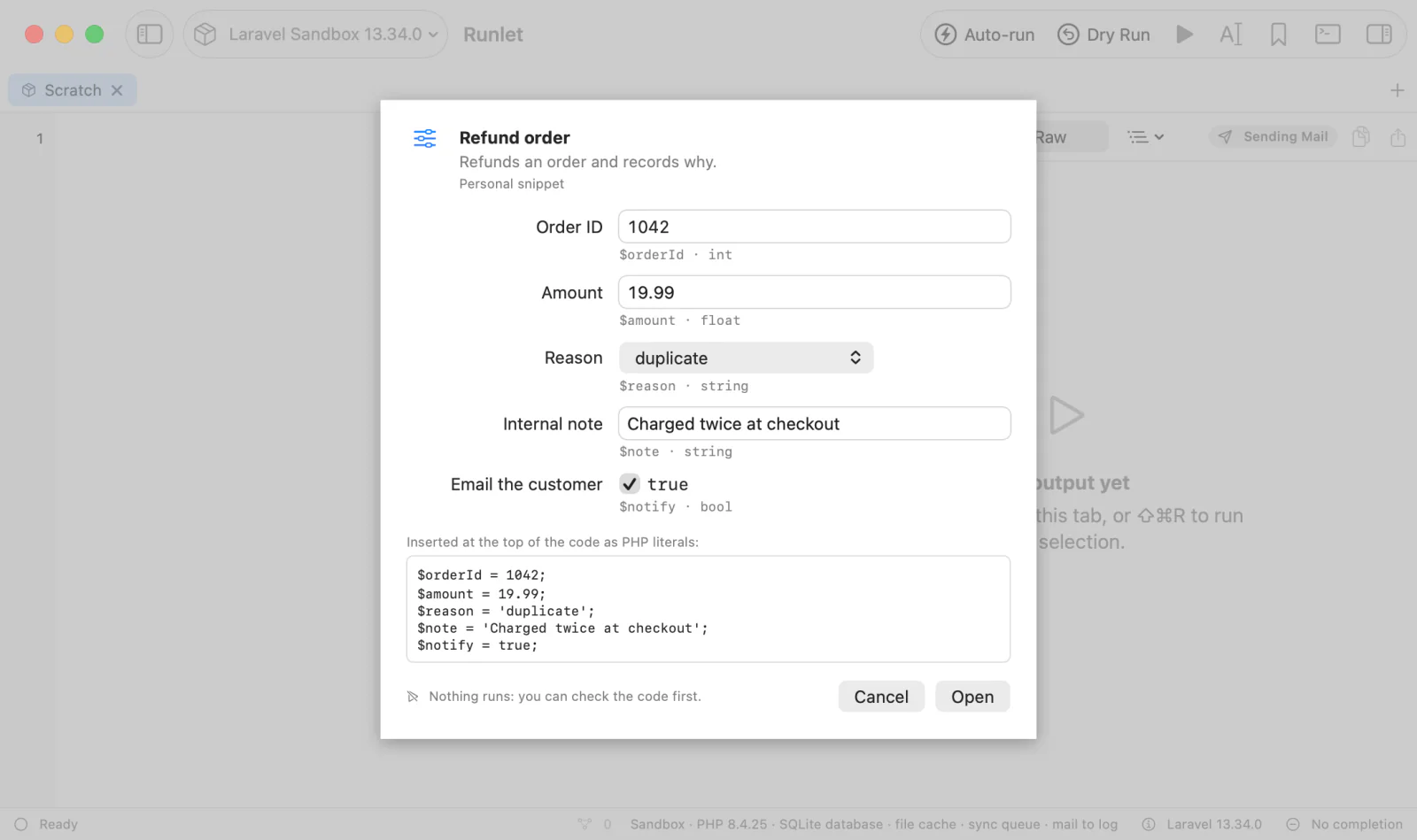
Types
| Type | In the form | Accepts |
|---|---|---|
int | A text field | A whole number with an optional sign, such as 42, -7, or 1_000. It must fit PHP's 64-bit range; larger numbers are refused rather than turned into floats. Leading zeros are decimal: 007 is 7, never octal. |
float | A text field | A decimal number with an optional exponent: 1.5, .5, 2e-3, 42. INF, NAN, hex floats, and numbers too large for a float are refused, and 1,5 asks for a dot. |
string | A text field | Any text, kept exactly as typed, spaces included. It may be empty. |
bool | A checkbox | Defaults may be true or false, and also 1/0, yes/no, or on/off. |
Names, Labels, Defaults, and Choices
- Name. A PHP variable name with its
$. Names are case-sensitive, as in PHP.$thisand$GLOBALSaren't allowed. - Label. Optional, in double or single quotes;
\"(or\') and\\escape inside it. Without a label, the form shows the variable's name. - Default. Optional, after
=. Quote a string default that has spaces. Without a default,intandfloatfields start empty and must be filled, astringstarts empty, and aboolstarts unchecked. - Choices. Optional and last, for
int,float, andstring:{paid, shipped}shows a menu instead of a text field. Quote a choice that has a comma, a brace, or spaces around it ({"on hold", 'a,b'}). The default must be one of the choices; without a default, the first choice is selected.
Where to Write Them
- In a project snippet,
@inputlines go in the metadata docblock at the top of the file. A docblock with only@inputlines counts as metadata too, and isn't part of the opened code. - In a personal snippet, the docblock stays in the code. Write the
@inputlines in a docblock at the start of the code (after<?php, whitespace, or other comments), and save it with Save as Snippet….
In both, Runlet reads every docblock before the first line of code; a docblock after code is ignored.
Mistakes in Declarations
Runlet never drops a declaration it can't read without telling you. The Snippets panel marks the snippet with an orange input problem badge (hover it for the reasons), and the form lists each problem, for example:
@input integer $limit: “integer” is not an input type. Use int, float, string, or bool.The snippet still opens, without that input. A variable declared twice keeps its first declaration.
Opening a Snippet With Inputs
A snippet with inputs shows the input form wherever you open it: Return or double-click in the Snippets panel, Open in Current Tab and Open in New Tab (⌘Return), ⇧Return to insert it at the cursor, and Open Anything (⌘P, then #).
The form has a row per input, with its label, a control for its type, its default, and its $name · type. A value that doesn't fit is explained in red and keeps Open disabled, and a preview shows the PHP lines the values become.
- Open puts the code, with the values, where the action said. It never runs, on any target, production included. Opening into the current tab turns its sandbox auto-run off, and new tabs start without it.
- Insert (⇧Return) puts the code with the values at the cursor. It's an edit like typing, so it runs only in a sandbox tab where you turned auto-run on, as any edit there does.
- Cancel or Esc opens nothing.
Snippets without @input lines open as they always do, without a form. Some other details:
- History keeps the code that ran, with its values, so opening a History entry never asks again.
- Copy Code copies the snippet as it is, without values.
- Copy to Personal Snippets copies a project snippet's
@inputlines into a docblock at the start of the personal copy, so the copy asks for the same inputs. Duplicate keeps them too.
What the Code Gets
Each value becomes one line, $name = <value>;, at the top of the code:
use App\Models\Order;

$orderId = 1042;
$amount = 12.5;
$reason = 'fraudulent';
$note = 'O\'Neil\'s card was charged twice ($49.90)';
$notify = true;

$order = Order::findOrFail($orderId);
The values go after the opening <?php, docblocks, declare(…), namespace …;, and single-line use …; imports, before the first other line, followed by a blank line. A <?php with code after it on the same line gets a line of its own.
Placeholder Lines
If the snippet's opening lines already assign an input, such as $orderId = 0; // set me, that line is a placeholder: Runlet replaces its value in place ($orderId = 1042; // set me) and doesn't assign the variable again. Keep such a line so the snippet still runs as it is, from Copy Code or for an AI client.
Only one-line assignments without another ;, before the first other statement, count. A later assignment is the snippet's own code and is left alone, so it would override the value.
Line Numbers
Everything Runlet adds is visible in the tab, and every value is on one line, so errors and dumps point at the lines you see. Without placeholders, the snippet's own lines move down by the number of values plus one.
How Values Are Written
Runlet writes each value as a PHP literal that evaluates to exactly the value in the form:
| Value | Written as |
|---|---|
int | 42, -7. The smallest 64-bit integer is -9223372036854775807-1, because -9223372036854775808 would be a float in PHP. |
float | The shortest digits that read back as the same float, always with a . or an exponent: 12.5, 1.0, 0.30000000000000004, 1.0E+25, 1.0E-5, -0.0. |
bool | true or false. |
string | Single-quoted, with only \ and ' escaped: 'O\'Neil', 'C:\\path'. $, {$x}, and Unicode text are written as they are; single quotes never interpolate. |
string with control characters | Double-quoted on one line, so the value can't spill over lines or hide characters: "line one\nline two". Newlines, tabs, and returns become \n, \t, and \r, and other invisible characters become escapes such as \x00 or \u{202E}. |
Redis and MongoDB Snippets
Redis snippets declare inputs in # @input lines, and the values fill $name arguments as quoted Redis arguments instead of PHP assignments. MongoDB snippets use // @input lines, and the values fill {"$input": "name"} placeholders as JSON values.
AI Clients (MCP)
When an AI client reads a snippet with inputs, it gets them as inputs: each one's name and type, plus label, default, and choices when they're declared. Declarations Runlet couldn't read are in input_problems.
"inputs": [
  {"name": "orderId", "type": "int", "label": "Order ID"},
  {"name": "reason", "type": "string", "label": "Reason", "default": "duplicate",
   "choices": ["duplicate", "fraudulent", "requested_by_customer"]}
]
A client that runs the snippet assigns the variables itself, and the run asks for your approval as usual.
As a Command or a Test
Save as Artisan Command… turns a snippet's inputs into the command's arguments and options: an input without a default is a required argument, one with a default or choices is an option, and a bool is a flag. Save as Test… gives each input its default. See Promote a Snippet.