
Project Commands
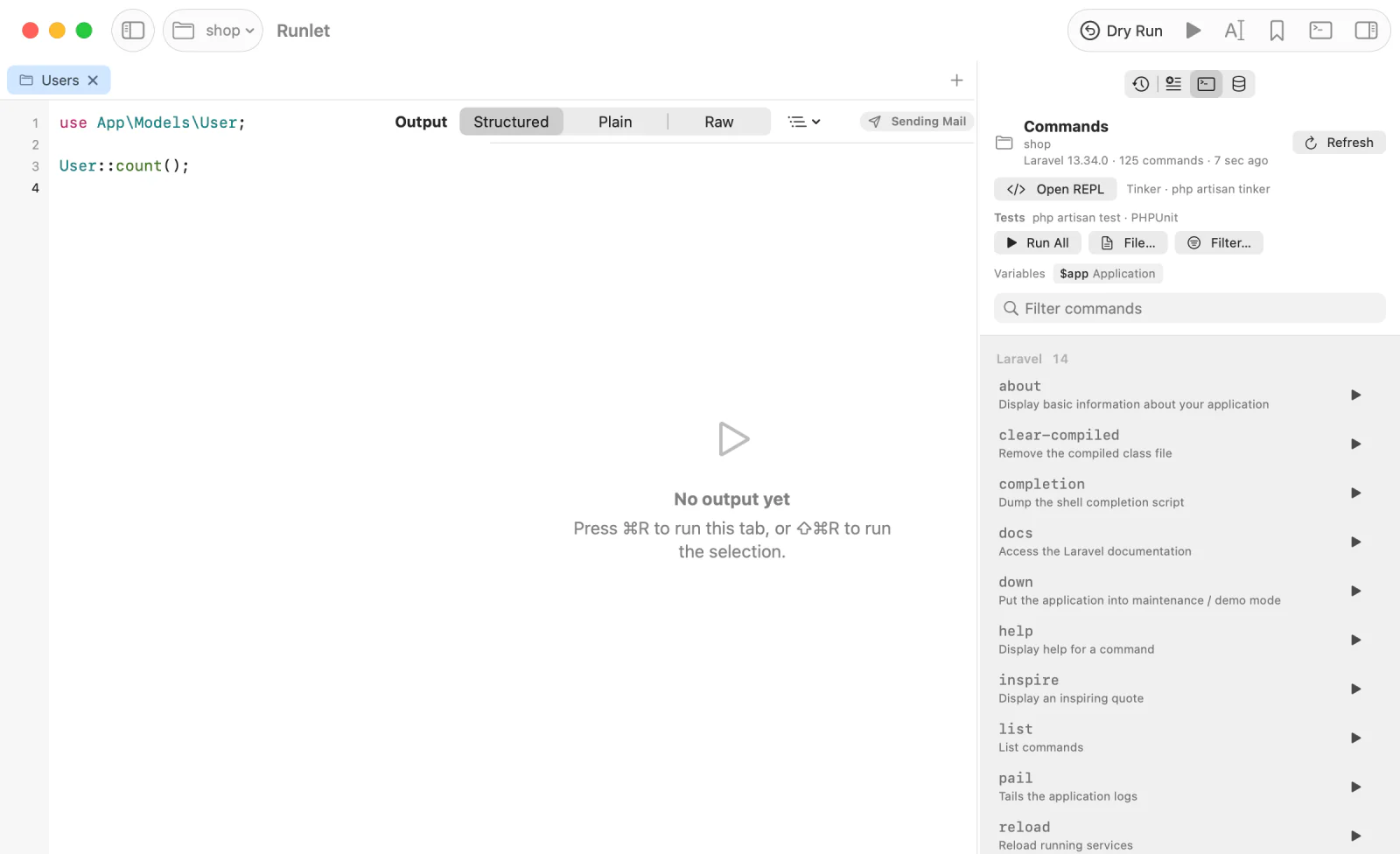
The Commands panel lists what you can run in the tab's project, such as Artisan or bin/console commands and Composer scripts, and runs each one in a terminal tab below the editor, on the tab's target. It also opens the project's REPL and runs its tests. A project driver can add commands of its own.
The Commands Panel
Choose Library ▸ Show Project Commands (⇧⌘K), or pick Commands in the History & Snippets panel. The list is grouped and searchable, and has three sources:
- The framework's commands: every visible Artisan command in Laravel and Lumen, a Laravel Zero application's commands (through its own binary), and every visible
bin/consolecommand in Symfony. WordPress, Composer, and plain PHP projects have none. - Composer scripts from the project's
composer.json, ascomposer run-script <name>, in the "Composer scripts" group. Composer's own event hooks (post-autoload-dump,pre-install-cmd, and the like) are skipped, and ascripts-descriptionsentry becomes the description. They're listed even when the application can't boot. - A project driver's commands, and its host commands, which run on your Mac. See Adding Commands.
Click a command's Run button to run it in a terminal tab. Its context menu also has Copy Command and Copy Name. A command that needs arguments, such as make:model, is typed into the terminal without pressing Return, so you can add them.
Above the list, the driver's snippet variables (such as $app) are shown: click one to insert it at the caret.
When Commands Are Listed
Listing commands boots the application in a fresh PHP process, like a run, but runs no snippet. So Runlet lists them only while the Commands panel is open: once per target, when the panel opens, or when you switch to a tab or target it hasn't listed yet. Refresh lists them again. A target whose listing failed isn't tried again until you press Try Again or Refresh.
- Kubernetes profiles wait for Load Commands, even when the panel was already visible. Opening Runlet never contacts the cluster.
- SSH hosts are listed only when you click List Commands on
<host>, since listing boots the application on the server. - Production targets are never listed by themselves. Listing, and every command (host commands too), asks first: ⌘Return confirms.
Where Commands Run
| Target | How a command runs |
|---|---|
| Local project, sandbox | In your login shell, in the project's folder. A leading php becomes the target's PHP, so Artisan runs on the same PHP as your snippets. |
| Docker profile | Inside the profile's container, in its working directory and as its user. Runlet finds the container again when you press Run, and asks you to choose when it's ambiguous or was recreated. |
| Kubernetes profile | Inside the chosen pod and container, with the profile's working directory, PHP, and temporary directory. The pod UID and readiness are checked immediately before connecting. See Kubernetes. |
| Laravel Sandbox in Docker | In a disposable container with the sandbox mounted, as for sandbox runs. |
| SSH host | On the server, in the profile's directory, with the profile's PHP and your login shell's PATH, or inside the container of a profile's container step. A command that needs input opens a shell with the command typed. See SSH. |
Host commands always run on your Mac. The terminal tab stays open when a command ends, so you can read its output.
The Terminal Panel
View ▸ Show/Hide Terminal opens the panel below the editor. New Shell, in its + menu, starts a shell on this Mac in the target's local folder when one is set. The same menu offers a shell in a Docker container, Shell in Pod for Kubernetes, or a shell on an SSH host.
Command tabs stay open after they finish. Run Again repeats a command. For Kubernetes, it asks for production confirmation again when needed, resolves and rechecks the pod, and opens a new terminal while keeping the previous output. Terminals aren't restored after quitting; a visible panel starts with a local shell.
Open REPL
Open REPL, in the panel (also Library ▸ Open REPL and the command palette), opens the target's own interactive REPL in a terminal tab, so state carries over from line to line. It doesn't need the command list, so it never boots the application by itself, and nothing starts until you click. Runlet picks the REPL from the project's files:
- Tinker (
php artisan tinker), whenartisanandvendor/laravel/tinker/exist: the sandbox, and Laravel applications with laravel/tinker; - PsySH (
php vendor/bin/psysh), when the project has it, whatever the framework; - PHP's interactive shell (
php -a) otherwise.
On Docker, Kubernetes, and SSH targets, the same choice happens inside the container or on the server, with the profile's PHP. Production targets ask every time.
NOTE
A driver can't change the REPL yet: the choice has to work before the application boots. To offer another console, add it to commands() or hostCommands().
Tests
Under Open REPL, the Tests group runs the project's test suite in a terminal tab:
- Run All runs every test.
- File… runs one test file. On your Mac, it opens a file picker in the project's first test folder; on Docker, Kubernetes, and SSH targets, it takes a path relative to the profile's directory.
- Filter… runs the tests matching a name or pattern (
--filter).
Like Open REPL, it doesn't need the command list, and nothing runs until you click. Runlet picks the runner from the project's files, in this order:
php artisan test, when the project hasartisan, Laravel's Collision package (which provides the command), and Pest or PHPUnit, with aphpunit.xmlorphpunit.xml.dist. It starts Pest when Pest is installed, else PHPUnit, as Laravel's owncomposer testdoes.- Pest (
php vendor/bin/pest), which also runs plain PHPUnit test classes. - PHPUnit (
php vendor/bin/phpunit).
The runner needs a PHPUnit configuration in the project's folder (phpunit.xml, phpunit.dist.xml, or phpunit.xml.dist), and at least one of its test suites' folders or files. A project without tests has no Tests group: the bundled sandbox ships without tests, so it has none. On Docker, Kubernetes, and SSH targets, the tab explains when the project has no runner, for example a deploy installed without dev dependencies.
WARNING
Tests are disabled on production targets, with the reason in the group: test suites often reset or migrate the database (RefreshDatabase, migrate:fresh), and the test database isn't always a separate one.
Adding Commands
A project driver adds commands with commands(). Return entries keyed by name: command is a shell command line that runs in the project's folder (inside the container for Docker targets), and description and group are optional. A string is short for ['command' => …].
<?php
// .runlet/AcmeApiDriver.php
class AcmeApiDriver extends \Runlet\Driver
{
    // canBootstrap(), bootstrap(), variables() as in Writing a Project Driver.

    public function commands(): array
    {
        return [
            'acme:routes' => [
                'command' => 'php bin/acme routes',
                'description' => 'List the routes of ' . DI::get(App::class)->name(),
                'group' => 'acme',
            ],
            'health' => 'php bin/acme health',
        ];
    }
}
commands() runs after bootstrap(), so it can use the booted application. To add to a built-in driver's commands, merge with the parent's:
<?php
// .runlet/OpsDriver.php
class OpsDriver extends \Runlet\Drivers\LaravelDriver
{
    public function commands(): array
    {
        return parent::commands() + [
            'deploy' => ['command' => './vendor/bin/envoy run deploy', 'description' => 'Deploy to production', 'group' => 'ops'],
            'horizon:pause' => 'php artisan horizon:pause',
        ];
    }
}- Set
'needsInput' => trueon a command that needs arguments: Run types it into the terminal without pressing Return. - A driver for another Symfony Console application can reuse Runlet's formatting:
$this->consoleCommands($application->all(), 'php bin/tool')skips aliases and hidden commands, setsneedsInputfor commands with a required argument, and groups each command by its namespace (make:modelin "make";migratejoins "migrate" whenmigrate:*commands exist). - A list of entries that each have a
nameworks too. Entries without a name or a command line are skipped, with a notice; only the first entry with a given name is kept; descriptions longer than 500 bytes are shortened.
If commands() throws or calls exit(), the panel shows the error, naming the driver file and method (… failed in commands(): …), with the Composer scripts. A boot error shows the same way.
Host Commands
hostCommands() declares commands that run on your Mac, in the project's folder there, instead of on the target. For a local project, that's the project's folder; for a Docker or SSH profile, its local source or local folder. Use it for tools installed on your Mac: docker compose, deploy scripts, or your team's own CLI.
public function hostCommands(): array
{
    return [
        // A static command, as in commands().
        'up' => ['command' => 'docker compose up -d', 'description' => 'Start the stack'],

        // A tool that prints its own command list as JSON for the folder it runs in.
        'biker' => ['list' => 'biker runlet:commands'],

        // A Symfony Console app (Laravel Zero, …): Runlet reads `mytool list --format=json`
        // and runs each command as `mytool <name>`.
        'mytool' => ['console' => 'mytool'],
    ];
}- Listing. A
listorconsolesource runs each time the panel loads or refreshes, with/bin/sh -c, in the project's folder on your Mac, with your login shell's environment, so tools in~/.bin, Homebrew, or Herd are found. - The
listformat. The command prints{"commands": [{"name": …, "command": …, "description"?: …, "group"?: …, "needsInput"?: true}]}. Output around the JSON object is ignored, and console style tags (<fg=gray>…</>) are removed from descriptions. Commands keep the tool's order, grouped bygroup, or under the source's name. - The
consoleformat. Hidden commands,list,help,completion, and_completeare skipped. A command with a required argument getsneedsInput. - Running one opens a terminal tab with your shell, in the project's folder on your Mac. Runlet never looks for a container for a host command, so
biker startworks even while the container is stopped. - When the app can't boot.
hostCommands()is called beforebootstrap(), so it must only return declarations. Host commands stay listed when the application can't boot, and when the target can't start at all (a stopped container), Runlet uses the last declaration it saw for that target.
A failing source shows its error above the list, for example biker: "biker runlet:commands" exited with code 127: … command not found. The other commands are still listed.